Save time by uploading your users in bulk with a spreadsheet
One of the easiest ways to upload groups of users into your Learn to Win account is by using a spreadsheet. Before getting started, do the following:
- Gather all of your users’ names and email addresses.
- Create your user groups. For help on creating your user groups, read our Creating User Groups article.
Once you have your user groups set and have gathered all of the information, click Management > Manage Users > Add Members.

In the next screen, select Import Roster. Click Choose CSV if the file is already created or Download our spreadsheet template if you need help setting up the template.
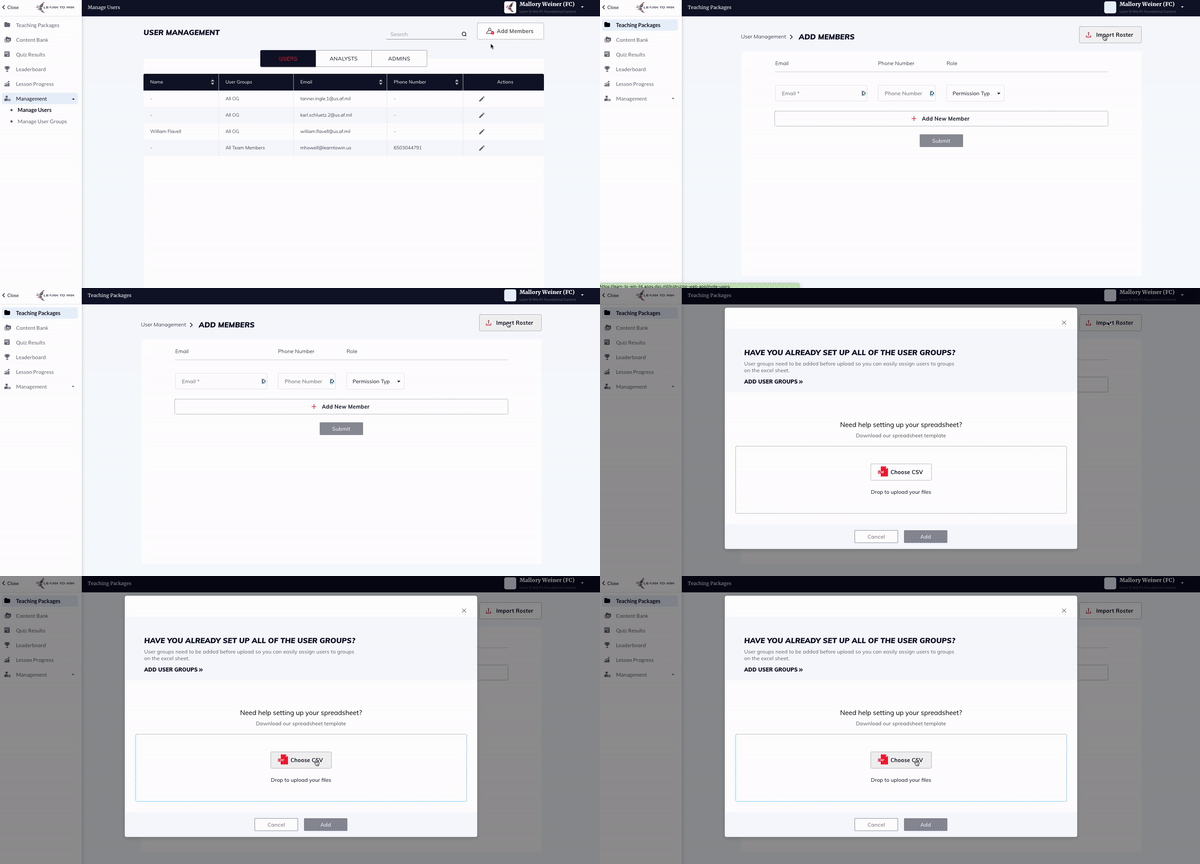
Click Add once your file has been uploaded. Please ensure the file is in the CSV format.
This will automatically add your users to the platform and assign any content to them that you may have made visible to their user group.
In addition to adding new users through this format, you may also add new user groups to existing users. To do this, you will include their information (email address, role, position group) as if they were a new user. This will not reset their password, but it will allow existing users to see content that has been assigned to their new user group.