Read more about how to bulk publish content to your learners on Learn to Win.
Add Users/Groups
On Learn to Win, you can add users and user groups to an entire package or folder of content. This feature will assign every lesson and quiz within a package or folder to each user and/or user group that you add at the package level.
Note: Adding Users/Groups does NOT impact visibility. These are two separate steps.
To add users and groups to a package follow these steps:
Step One:
Create content inside a folder that you want to share with learners. For help on this step, head to this article.
Step Two:
Navigate back to the package screen of your admin account. Here is where you can add users and user groups to view the content.
You can also do this from the folder level too. The distinction here would be whether you have different packages inside a folder for different groups of people. If you only want certain packages visible to certain groups, use the visibility at the package level. If all content inside a folder should be shared with a group or individual, use the feature at the folder level.
Hover over a package or folder and click on the gear in the top right corner. Scroll to the second option that says Add Users/Groups.
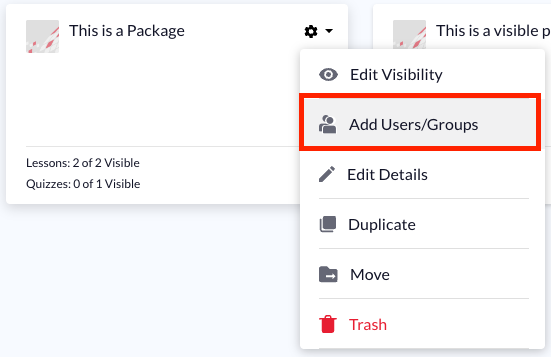
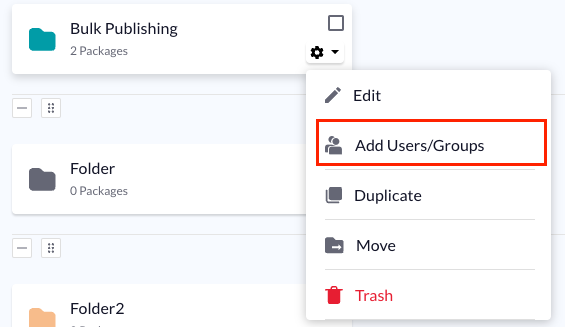
You will see a pop-up screen that has a list of all existing user groups. As you keep scrolling down the list, you can add individual users as well. You can make content visible to a variety of groups and individual users.
Edit Visibility
This step gives admin the ability to make all content within a package visible to learners with a simple click.
Note: You can edit the visibility before or after adding users/groups
Step One:
At the package level, click Edit Visibility after clicking on the gear icon.
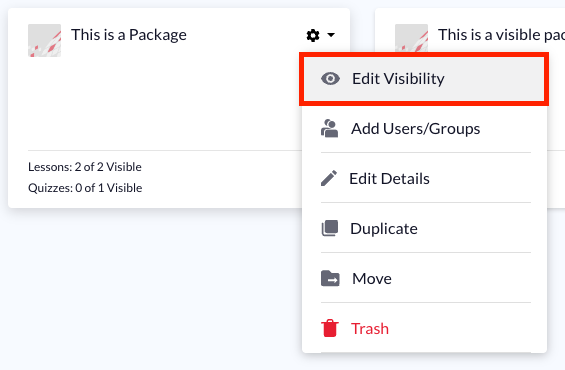
This will open a modal allowing you to either make all lessons and quizzes visible, or hide all lessons and quizzes. Select the option you would like, and clickSave.
If all content is currently hidden, the option to Hide All Lessons and Quizzes Now will be grayed out. You will only have the option to Make All Lessons and Quizzes Visible Now. Alternatively, if all content is currently visible, the option to Make All Lessons and Quizzes Visible Now will be grayed out. You will only have the ability to hide content.
If you have a mixture of visible and hidden lessons within the package, both options will be available.
Visibility at the Lesson/Quiz Level
If you want to make only some of the lessons and quizzes within a package available to learners, you can edit visibility at the lesson/quiz level. You do not need to add users/groups at this stage to make a lesson visible.
Inside the package, click on the gear icon for any desired lesson or quiz. Click,Edit Visibility. At this point, you can choose toMake Visible Now, add a due date, or schedule a lesson or quiz to become visible at a later date.